
Open your Profile Widget
- Open your Sitee editor.
- Select the Profile Widget at the top of your page.
- Update the information you want to display.
- Select Save when you are finished.
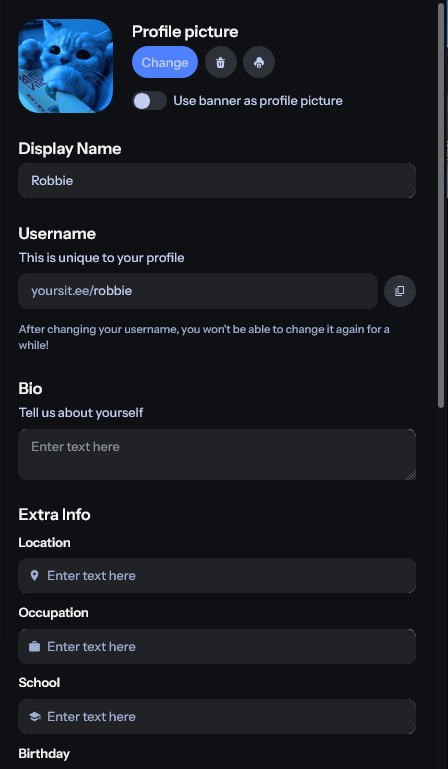
Profile picture
You can upload, change, remove, or download your current profile picture from the Profile Widget. Square images work best because profile pictures are displayed in a square format.Built-in profile picture cropping is coming soon. This will make it easier to adjust non-square images directly in the editor.
Display name and username
Display name
Your display name is the name visitors see on your Sitee. It can contain up to 30 characters and may use letters, numbers, symbols, and other supported characters.Username
Your username identifies your account and forms part of your public YourSitee URL. For example, the username@example creates the URL https://yoursit.ee/example.
Usernames:
- Must be between 2 and 32 characters
- Can contain lowercase letters, numbers, and underscores
- Cannot contain consecutive underscores
- Are not case-sensitive
- Must follow the Username policy
Bio and profile information
Bio
Use your bio to briefly introduce yourself, your work, your organization, or your community. The bio can contain up to 250 characters, or you can leave it empty.Extra information
You can add optional information below your bio:- Location: enter your location (city, country, something funny, or anything else!)
- Occupation: What you do or where you work
- School: A school you attend or previously attended
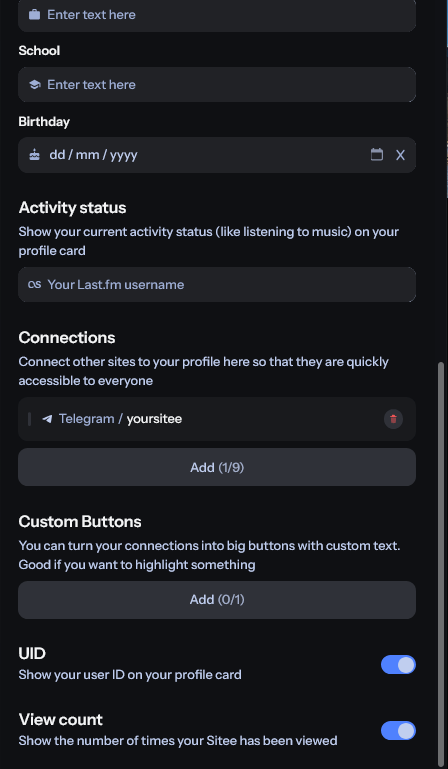
- Birthday (date): here you can enter the date you were born, and we’ll show visitors how old you are.
Only add information you are comfortable sharing publicly. Anything entered into these fields may be visible to visitors on your Sitee.
Badges
If your account has one or more YourSitee badges, you can choose which eligible badges appear next to your profile information. Badges may represent verification, a subscription, community participation, staff roles, or other forms of recognition. Learn more in YourSitee Badges 101.Social media connections
Connections let you add supported social, creator, music, gaming, developer, community, and payment profiles to your Profile Widget. They use recognizable platform icons and provide a compact way for visitors to find your accounts. Free users can add up to 9 social media connections. Learn how to add social media connections.Custom Buttons
Custom Buttons let you create an action with your own label. A Custom Button can:- Open a URL
- Copy a text value for the visitor
User ID
Your user ID, or UID, is the permanent numerical ID assigned to your account when it is created. It cannot be changed. You can choose whether it appears on your Profile Widget.Related articles
Customize your appearance
Change your Sitee’s colors, fonts, banner, corners, and layout.
Add social media connections
Connect your supported profiles to your Profile Widget.