> ## Documentation Index
> Fetch the complete documentation index at: https://help.yoursit.ee/llms.txt
> Use this file to discover all available pages before exploring further.
# Set up your Profile Widget
The **Profile Widget** is the main, non-removable widget on your Sitee. It contains the profile information visitors see first, including your picture, name, bio, social connections, and Custom Buttons.
## Open your Profile Widget
1. Open[ your Sitee editor](https://yoursit.ee/dashboard/login).
2. Select the Profile Widget at the top of your page.
3. Update the information you want to display.
4. Select **Save** when you are finished.
 ## Profile picture
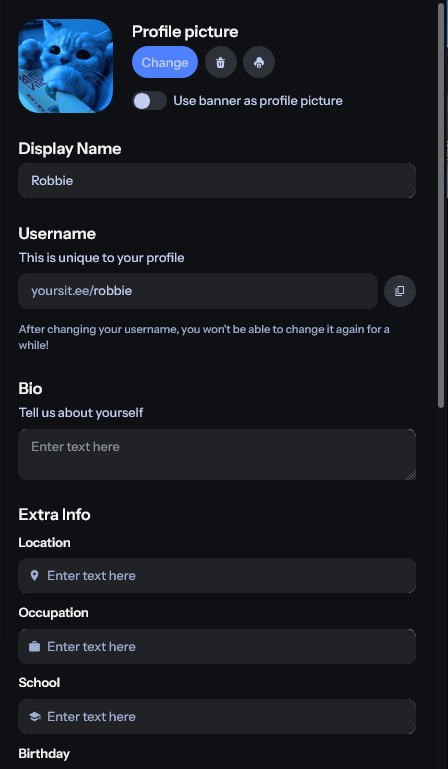
You can upload, change, remove, or download your current profile picture from the Profile Widget.
Square images work best because profile pictures are displayed in a square format.
**Built-in profile picture cropping is coming soon.** This will make it easier to adjust non-square images directly in the editor.
You can also enable **Use banner as profile picture** to display your banner image in place of a separate profile picture.
## Display name and username
### Display name
Your display name is the name visitors see on your Sitee.
It can contain up to **30 characters** and may use letters, numbers, symbols, and other supported characters.
### Username
Your username identifies your account and forms part of your public YourSitee URL.
For example, the username `@example` creates the URL `https://yoursit.ee/example`.
Usernames:
* Must be between **2 and 32 characters**
* Can contain lowercase letters, numbers, and underscores
* Cannot contain consecutive underscores
* Are not case-sensitive
* Must follow the [Username policy](/resources/content/username-policy)
Learn more in [What is your username?](/account/what-is-your-username).
## Bio and profile information
### Bio
Use your bio to briefly introduce yourself, your work, your organization, or your community.
The bio can contain up to **250 characters**, or you can leave it empty.
### Extra information
You can add optional information below your bio:
* Location**:** enter your location (city, country, something funny, or anything else!)
* Occupation**:** What you do or where you work
* School**:** A school you attend or previously attended
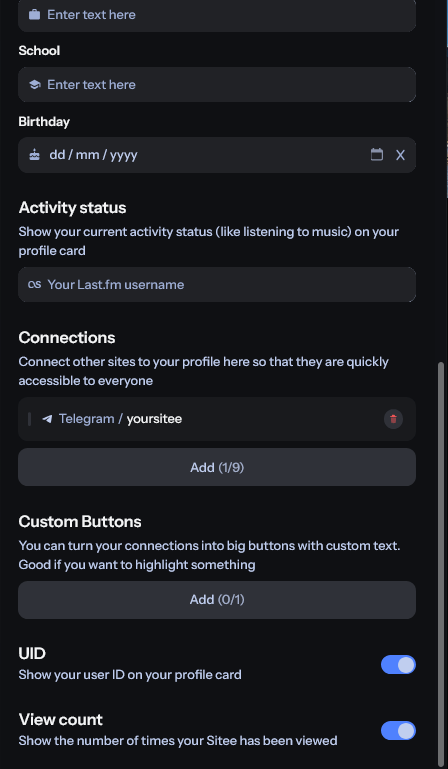
* Birthday (date)**:** here you can enter the date you were born, and we'll show visitors how old you are.
Each field can contain up to **30 characters**.
**Only add information you are comfortable sharing publicly.** Anything entered into these fields may be visible to visitors on your Sitee.
## Badges
If your account has one or more YourSitee badges, you can choose which eligible badges appear next to your profile information.
Badges may represent verification, a subscription, community participation, staff roles, or other forms of recognition.
Learn more in [YourSitee Badges 101](/articles/profile-badges-101).
## Social media connections
Connections let you add supported social, creator, music, gaming, developer, community, and payment profiles to your Profile Widget.
They use recognizable platform icons and provide a compact way for visitors to find your accounts.
Free users can add up to **9 social media connections**.
[Learn how to add social media connections](/start/add-social-media-connections).
## Custom Buttons
Custom Buttons let you create an action with your own label.
A Custom Button can:
* Open a URL
* Copy a text value for the visitor
Free users can add **1 Custom Button** to their Profile Widget.
Learn more in [How to add an external link on YourSitee](/start/how-to-add-an-external-link-on-your-sitee).
## User ID
Your user ID, or **UID**, is the permanent numerical ID assigned to your account when it is created.
It cannot be changed. You can choose whether it appears on your Profile Widget.
**According to some Siteers,** the lower your UID is, the cooler you are. 😎
## Related articles
Change your Sitee’s colors, fonts, banner, corners, and layout.
Connect your supported profiles to your Profile Widget.
## Profile picture
You can upload, change, remove, or download your current profile picture from the Profile Widget.
Square images work best because profile pictures are displayed in a square format.
**Built-in profile picture cropping is coming soon.** This will make it easier to adjust non-square images directly in the editor.
You can also enable **Use banner as profile picture** to display your banner image in place of a separate profile picture.
## Display name and username
### Display name
Your display name is the name visitors see on your Sitee.
It can contain up to **30 characters** and may use letters, numbers, symbols, and other supported characters.
### Username
Your username identifies your account and forms part of your public YourSitee URL.
For example, the username `@example` creates the URL `https://yoursit.ee/example`.
Usernames:
* Must be between **2 and 32 characters**
* Can contain lowercase letters, numbers, and underscores
* Cannot contain consecutive underscores
* Are not case-sensitive
* Must follow the [Username policy](/resources/content/username-policy)
Learn more in [What is your username?](/account/what-is-your-username).
## Bio and profile information
### Bio
Use your bio to briefly introduce yourself, your work, your organization, or your community.
The bio can contain up to **250 characters**, or you can leave it empty.
### Extra information
You can add optional information below your bio:
* Location**:** enter your location (city, country, something funny, or anything else!)
* Occupation**:** What you do or where you work
* School**:** A school you attend or previously attended
* Birthday (date)**:** here you can enter the date you were born, and we'll show visitors how old you are.
Each field can contain up to **30 characters**.
**Only add information you are comfortable sharing publicly.** Anything entered into these fields may be visible to visitors on your Sitee.
## Badges
If your account has one or more YourSitee badges, you can choose which eligible badges appear next to your profile information.
Badges may represent verification, a subscription, community participation, staff roles, or other forms of recognition.
Learn more in [YourSitee Badges 101](/articles/profile-badges-101).
## Social media connections
Connections let you add supported social, creator, music, gaming, developer, community, and payment profiles to your Profile Widget.
They use recognizable platform icons and provide a compact way for visitors to find your accounts.
Free users can add up to **9 social media connections**.
[Learn how to add social media connections](/start/add-social-media-connections).
## Custom Buttons
Custom Buttons let you create an action with your own label.
A Custom Button can:
* Open a URL
* Copy a text value for the visitor
Free users can add **1 Custom Button** to their Profile Widget.
Learn more in [How to add an external link on YourSitee](/start/how-to-add-an-external-link-on-your-sitee).
## User ID
Your user ID, or **UID**, is the permanent numerical ID assigned to your account when it is created.
It cannot be changed. You can choose whether it appears on your Profile Widget.
**According to some Siteers,** the lower your UID is, the cooler you are. 😎
## Related articles
Change your Sitee’s colors, fonts, banner, corners, and layout.
Connect your supported profiles to your Profile Widget.