> ## Documentation Index
> Fetch the complete documentation index at: https://help.yoursit.ee/llms.txt
> Use this file to discover all available pages before exploring further.
# How to change your username
Your username is part of your public YourSitee link. You can change it from your **Profile Widget** when a different username becomes a better fit for you, your brand, or your project.
**Changing your username also changes your YourSitee link.** Update the URL anywhere you previously shared it, including social media profiles, websites, and email signatures.
## Change your username
Open [your Sitee editor](https://yoursit.ee/dashboard/login) and select the **Profile Widget** or click the Profile Card setting in the toolbar at the bottom.
Scroll to the **Username** field in the Profile Widget settings.
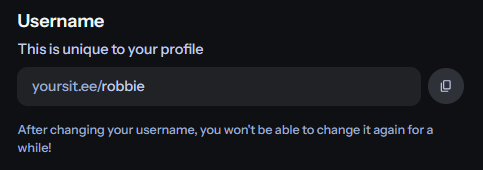 Type the username you want to use. It must be available and follow our [Username policy](/resources/content/username-policy).
Select **Save** to update your username and public YourSitee link.
## Username change limits
Free users can change their username once every **14 days**.
***
Available on Pro plan
Users on the Pro plan can change their username once every **24 hours**.
**The cooldown starts when your username is changed.** You will need to wait until it ends before choosing another username.
## Before changing your username
Keep these points in mind:
* Your previous YourSitee link may stop leading to your profile.
* **Links you shared elsewhere will need to be updated.**
* A username you leave behind may later become available to someone else.
* If you use a YourSitee domain as your Bluesky handle, you may need to verify the new domain again.
## Related articles
Learn how your username identifies your account and creates your public YourSitee link.
Review the rules and requirements that apply to YourSitee usernames.
Type the username you want to use. It must be available and follow our [Username policy](/resources/content/username-policy).
Select **Save** to update your username and public YourSitee link.
## Username change limits
Free users can change their username once every **14 days**.
***
Available on Pro plan
Users on the Pro plan can change their username once every **24 hours**.
**The cooldown starts when your username is changed.** You will need to wait until it ends before choosing another username.
## Before changing your username
Keep these points in mind:
* Your previous YourSitee link may stop leading to your profile.
* **Links you shared elsewhere will need to be updated.**
* A username you leave behind may later become available to someone else.
* If you use a YourSitee domain as your Bluesky handle, you may need to verify the new domain again.
## Related articles
Learn how your username identifies your account and creates your public YourSitee link.
Review the rules and requirements that apply to YourSitee usernames.